01FIND
Find the problems
Check product descriptions, SEO metadata, images, stock and other catalog signals that can affect discoverability and content quality.
A clearer way to improve your Shopify store
BrandPulse scans your catalog, finds SEO and product issues, and tells you what to fix first.
Find missing SEO details, thin product content, image gaps and stock issues—then see what to fix first.
Free plan · Works inside Shopify · Connects with Sidekick
BrandPulse + Shopify Sidekick
BrandPulse makes your latest store scan available to Shopify Sidekick. Ask about store health, top opportunities, products with weak SEO, this week's focus or recent optimization progress—without leaving Shopify.
Sidekick surfaces analysis and can link back into BrandPulse. It doesn't change product data; review and apply suggestions in BrandPulse.
Explore BrandPulseAn example question in Sidekick
What should I fix today?
Sidekick can look up store health, prioritized opportunities and the products that need attention.
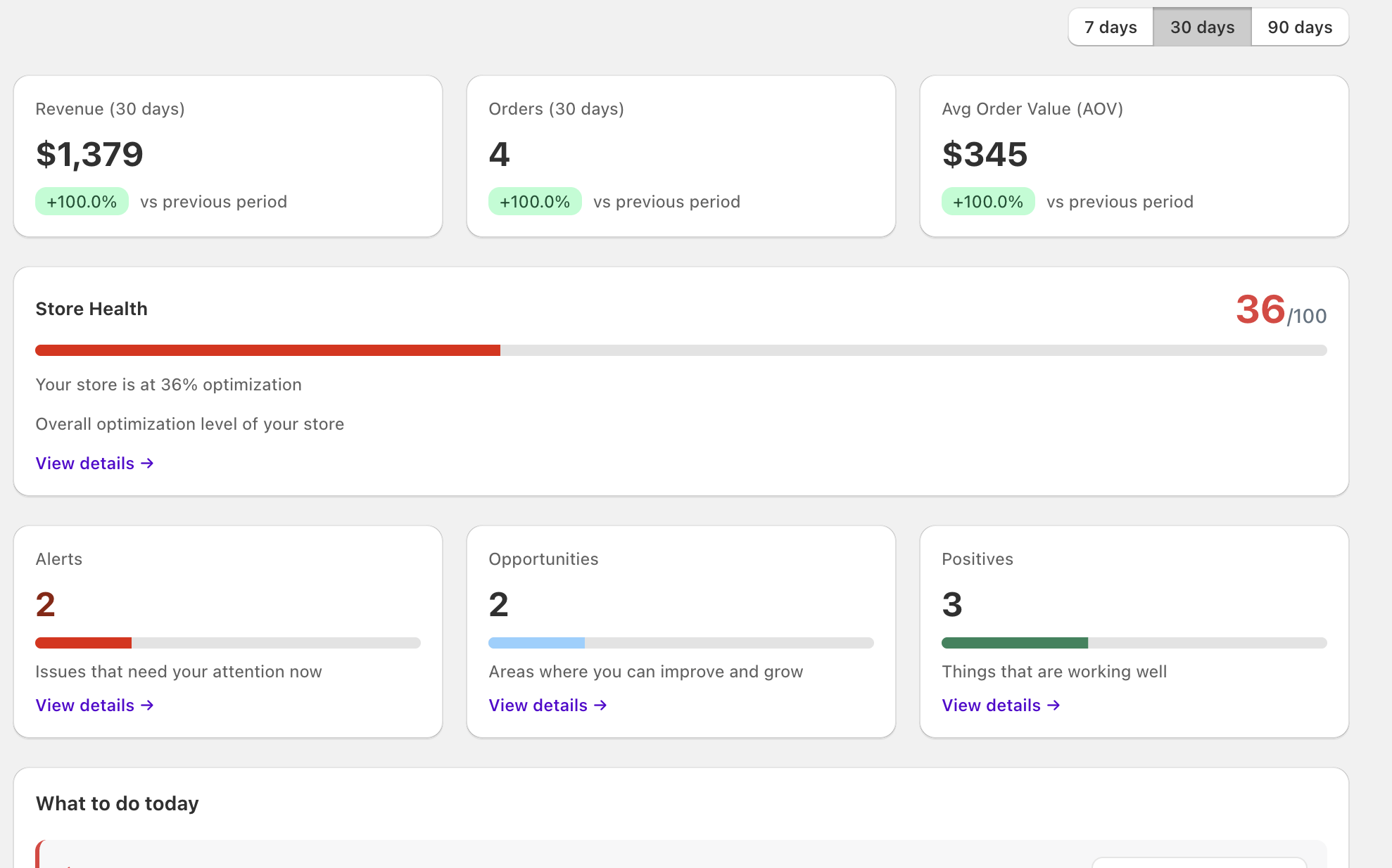
Example store scan
BrandPulse turns catalog checks into a prioritized list, so you can focus on the improvements that matter.
Example findings — counts vary by store
How it works
From the first catalog scan to a reviewed improvement, BrandPulse keeps the next step clear.
Check product descriptions, SEO metadata, images, stock and other catalog signals that can affect discoverability and content quality.
See the opportunities BrandPulse identifies, with higher-priority issues surfaced before the rest.
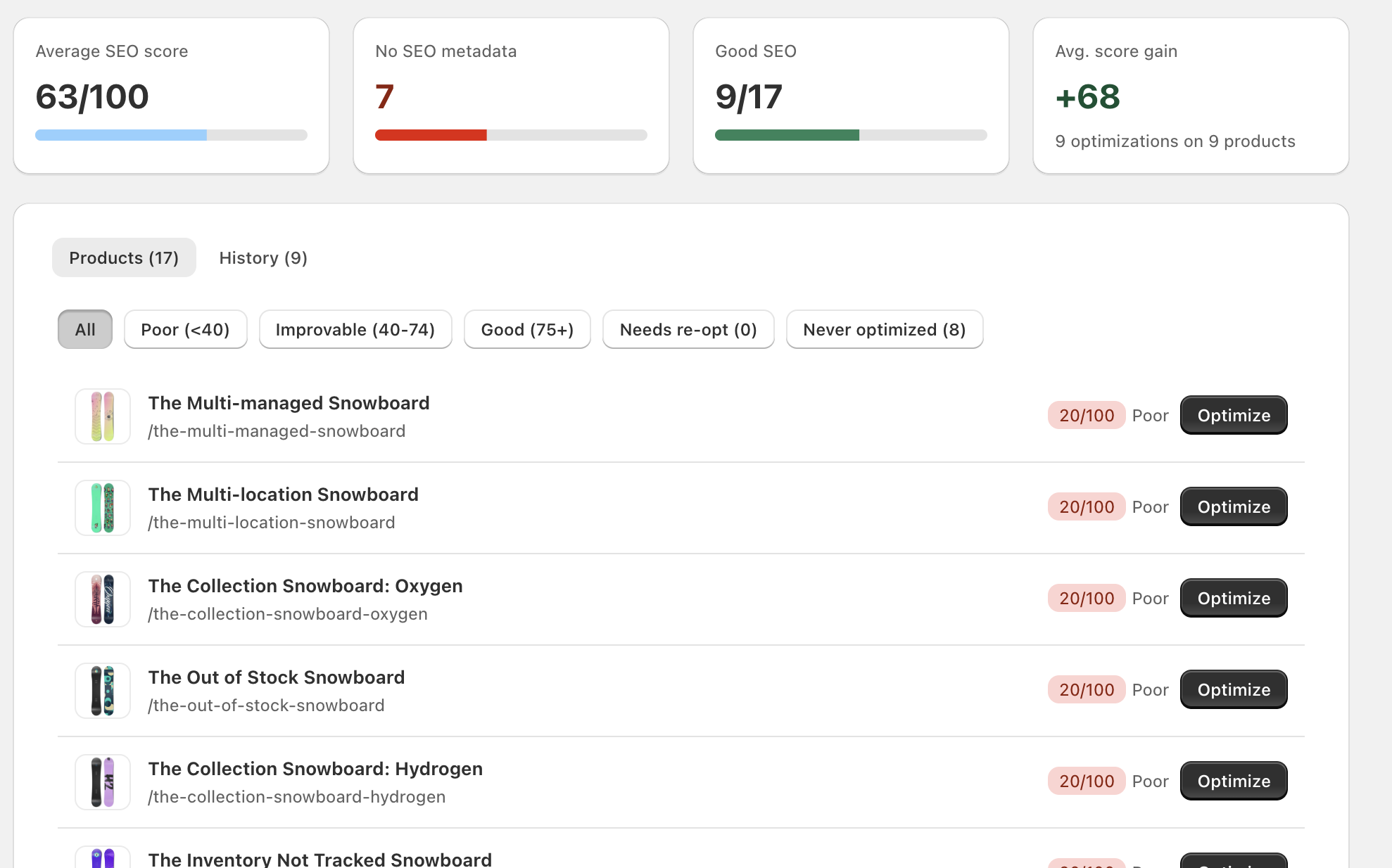
Example: 17 products need SEO attention. Start with these 3.
Open a product, generate an SEO suggestion, review it and apply it from inside your Shopify admin.
A useful first step, even on day one
BrandPulse doesn't need weeks of order history to be useful. It can start analyzing your catalog as soon as you install it.
Product SEO
Review SEO scores and find missing titles, meta descriptions, thin descriptions, image gaps and stock issues. Generate an SEO suggestion, review it and apply it from Shopify.
AI-assisted fixes when you need them. You review every suggestion before it changes a product.
Beyond the first fix
When you return to BrandPulse, review current catalog opportunities and this week's focus. Track the SEO improvements you've applied in Impact.
More ways to stay on top of your store
Spot missing descriptions, SEO metadata, images and inventory issues.
Review product SEO and audit your homepage and collection pages.
See prioritized actions and product-level risk signals based on available store data.
Review applied SEO changes and get a weekly view of store performance.
Pricing
Explore BrandPulse with the Free plan, then upgrade as your store's needs grow.
Free
$0/ month
25 AI credits/month
Starter
$19/ month
100 AI credits/month
Pro
$49/ month
500 AI credits/month
Scale
$99/ month
Unlimited AI generations with your own OpenAI key
Paid plans are billed through Shopify. Manage your subscription from your Shopify admin.
Early Merchant Program
We're inviting a small group of Shopify merchants to try the new BrandPulse experience, get extended access and help us understand what makes the biggest difference in a real store.
Try the product, share feedback and help us improve onboarding. No review or testimonial is required.
FAQ
No. BrandPulse can review catalog and product issues from the moment it is installed. Sales data adds context to performance insights when available.
No. You review the SEO suggestion and choose to apply it. BrandPulse does not apply generated product changes without your action.
Yes. The Free plan costs $0 per month and currently includes 25 AI credits per month. Paid plans and allowances are shown above.
Yes. Catalog checks such as product content, SEO metadata and inventory do not depend on order history.
It checks product descriptions, SEO titles and meta descriptions, images, inventory and catalog opportunities. Order data can add sales and performance context.
You can uninstall the app from Shopify. See our Privacy Policy for how store data is handled after uninstall.
The landing page and app are available in English and Spanish. The Spanish landing page uses Spanish from Spain.
Paid subscriptions are billed through Shopify. You can manage your plan from your Shopify admin.
Your next step
Run your first store scan and see what deserves your attention.
Scan my store free